
Universal online check-in
One check-in link for every booking
Share the same link with every guest of a property. They locate their booking, fill in their details and sign from their phone — no app to download.
A single link for every guest — whether the booking is already created or still pending to register.
- One permanent link per property
- No apps, no installs
- Connected to SES Hospedajes
A simpler way to share the check-in
What is the universal online check-in?
Every booking can already have its own registration link. With the universal online check-in you can also use a fixed link for each property and share the very same address with all of your guests.
When the traveller opens the link, the system asks for the details needed to locate an existing booking. Once identified, they can enter guest information and sign from their phone.
How it works
From booking to completed check-in
- 01
Create or import the booking
Add the booking manually or import it via iCal from Airbnb, Booking, VRBO, Avaibook or any compatible platform.
- 02
Share the universal link
Always send the same link for that property, with no need to look up an individual booking link.
- 03
The guest identifies the booking
The traveller fills in the requested details so the form can locate their booking securely.
- 04
Guests complete details and signatures
Each guest adds the required data and signs digitally from their phone.
- 05
You submit the report from your panel
From your panel, you review the information and submit the traveller report to SES Hospedajes with the usual Checkin Vacacional flow.
Bookings not yet created
Booking not created yet? No problem
If you enable the option “Allow check-in even if the booking is not found”, guests can complete their details and signatures from the universal link even when the system cannot match an existing booking.
The check-in is saved under “Check-in requests”, pending your review. From there, you can check the information and continue managing it.
This way, you can always share the same link and receive guest data, even if the booking has not been created or imported into the platform yet.
- 1
The guest opens the universal link
They enter their booking ID or surname so the system can try to locate the booking.
- 2
They complete the check-in
If no booking is found, they can still enter their details and signatures.
- 3
You review the request
The check-in shows up under “Check-in requests” for you to review and manage.
Activation from your panel
How to enable the universal check-in
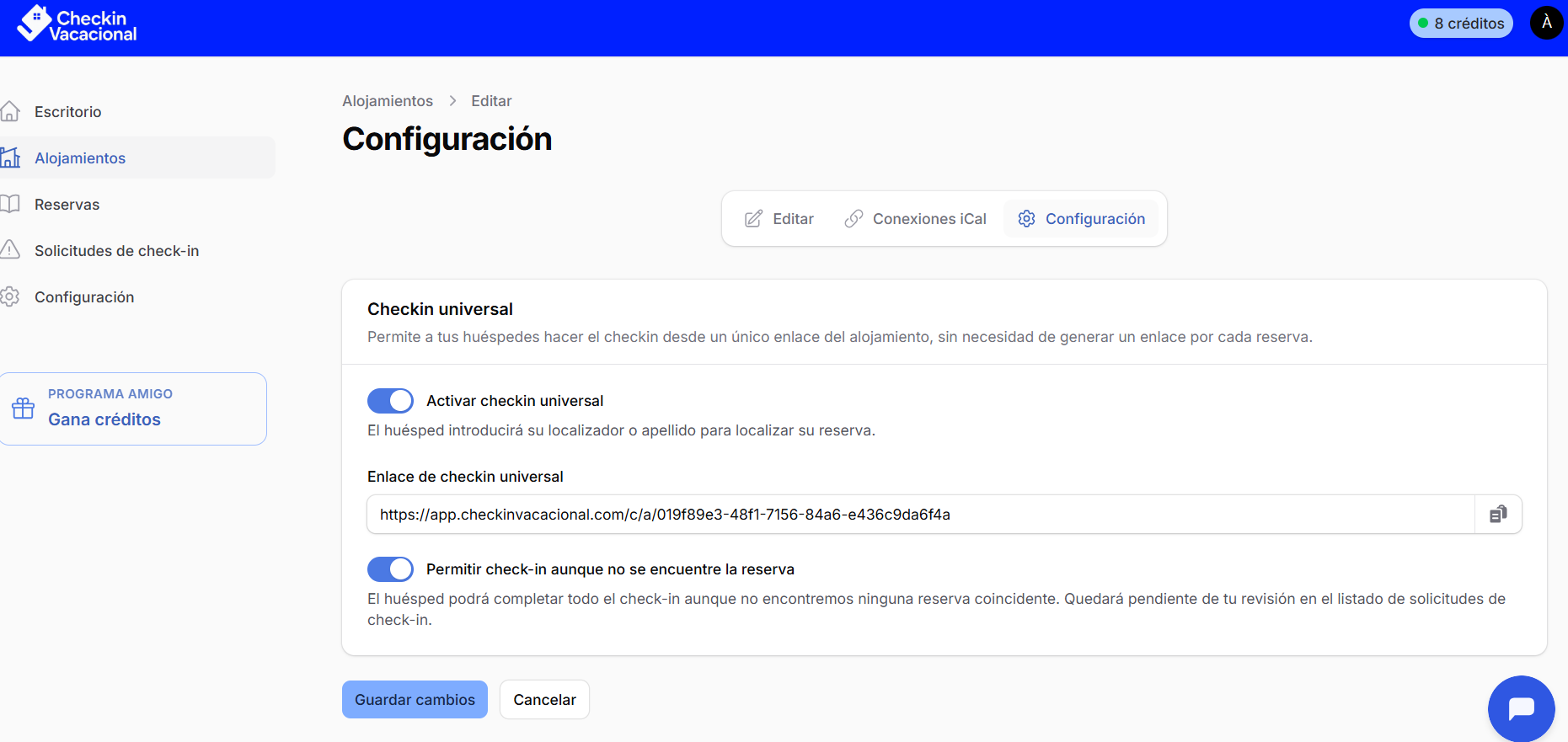
You can turn the universal link on in seconds from each property's settings inside Checkin Vacacional.
- 1
Open the Properties section in your panel.
- 2
Enter the property you want to configure.
- 3
Open the Settings tab.
- 4
Turn on “Universal check-in”.
- 5
To accept check-ins for bookings not yet registered, also turn on “Allow check-in even if the booking is not found”.
- 6
Save the changes and copy the link to share it with your guests.
- You can turn it on or off at any time and manage it independently for each of your properties.
Always at hand
Share the link wherever you need it
Booking and other OTA messages
Add the link to confirmation messages or pre-arrival instructions.
Airbnb
Send it to guests through the channels that the platform allows.
Keep the link handy and send it as soon as you confirm a booking or before arrival.
Add it to your welcome or booking-confirmation templates.
Website
Publish a “Check in” button on your property website.
QR code
Turn the link into a QR code and share it digitally or place it inside the property.
Two ways to share the registration
Pick the link that fits each situation
Individual link per booking
- Generated specifically for one booking.
- You can send it directly to the lead guest.
- The guest lands straight on the matching form.
- Ideal for personalised communications.
Universal link per property
- Always the same for a given property.
- Perfect to keep in automated messages and templates.
- The guest identifies their booking first.
- Great for OTAs, PMS, channel managers, websites and QR codes.
Both options lead to the same traveller-registration process. Use individual links, the universal link, or combine both — whatever fits your workflow.
Less manual work
Why use a universal link?
No more chasing individual links
Keep one address per property and reuse it for every booking.
Ready for automation
Drop the link into auto-replies, welcome messages and communication templates.
Nothing slips through
Check-ins with no matching booking are stored under “Check-in requests”, waiting for you to review them.
Works on any device
Travellers can fill in their details and sign from a phone, tablet or computer.
Booking import
Combine it with iCal sync
Connect the iCal calendar of Airbnb, Booking, VRBO, Avaibook or any compatible platform to import booking dates. After reviewing and completing the required data, your guests can locate their booking using the property's universal link.
iCal import does not automatically submit the booking to SES Hospedajes. You need to review the data and send it from Checkin Vacacional.
Bookings correctly matched
An open link, a controlled process
Even though the link can be shared publicly or embedded in a QR code, every check-in is tied to its property. When the traveller submits their data, the system tries to match an existing booking and, if it cannot find one, stores the check-in as pending review.
This helps you avoid duplicate registrations, wrong bookings or data from people who have no stay associated.
- Universal link
- Booking validation
- Guest data and signatures
- Review and submission to SES Hospedajes
FAQ
Frequently asked questions about the universal check-in
Is it the same link for every guest?
Yes. Each property has its own universal link that you can share with the guests of every booking.
Does the guest need an existing booking?
Not necessarily. If you enable “Allow check-in even if the booking is not found”, guests can complete their details and signatures from the universal link even when no matching booking exists. The check-in is saved under “Check-in requests”, pending your review.
Can I keep using individual links?
Yes. You can still send the specific link for a booking or use the property's universal link.
Do guests have to install an app?
No. The form opens directly in the browser and can be completed from a phone, tablet or computer.
Can I place it on my website?
Yes. You can add a check-in button on your property's site pointing to the matching universal link.
Can I use it as a QR code?
Yes. You can turn the link into a QR code and share it digitally or place it physically in the property.
Is the check-in submitted to SES Hospedajes automatically?
No. When guests finish registering, you review the information from your panel and submit the traveller report to SES Hospedajes.
Does every property have a different link?
Yes. Every property configured in Checkin Vacacional has its own universal link, so bookings from different properties never mix.
Simplify the check-in of every booking
Use a permanent link per property, gather guest data and signatures, and submit to SES Hospedajes from a single panel.
3 free credits to start · No monthly fees · No commitment